Why our WordPress server hit 100% CPU (and it wasn’t an attack)

Our WordPress server kept hitting its CPU limit. The cause was our own website, not an attack. Crawlers kept visiting mainly one page, our blog list. Our site rebuilt this page partially on every visit, and each rebuild sent new queries to WordPress.
It started with a message from our host. They saw about 2,400 requests a day from several US cloud IP addresses, with a node user agent. They thought a script or a polling loop caused them. One evening, the CPU stayed at 100% for 40 minutes.
Below, we show how we found the cause, what we changed, and a checklist for your own headless WordPress site.
The setup: who talks to WordPress
Our site is headless. WordPress only stores the content. A Next.js app on another host builds the pages that visitors see.
- The website reads content through the WPGraphQL, in three languages (EN, FR, RU).
- Visitors and bots never connect to WordPress directly. Server sends them the pages and serves most pages from its cache.
This last point is important. When server rebuilds a page, it asks WordPress for the data again. So each page view that is not in the cache causes work for WordPress.
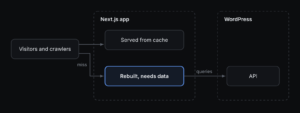
Our site rebuilt the blog list on every visit, because its pagination ran through URL parameters. A cache was there from the start, but Next.js cached only the pages, not their URL-parameter versions. So each crawler visit to that page caused work for WordPress.
What the logs showed
The node user agent was the first clue. Next.js sends this user agent when it gets data on the server. The US cloud IP addresses matched the default region of our hosting platform. So our own app sent the requests. The next question was: why did the app ask so often?
The request logs of our hosting platform gave the answer. We exported 23 hours of logs with its command-line tool. Then we counted the pages that the platform rebuilt instead of serving from its cache.
| Page | Rebuilt in 23 h | Main visitor |
|---|---|---|
/blog (all 3 languages) | 1,344 | ClaudeBot (1,073), then MJ12bot, PetalBot etc |
/works | about 90 | mixed |
| Everything else | almost always cached | — |
The error logs and the deploy history gave two more findings:
- Scanners requested paths like
/.envand/ads.txt. Our home page read.envas a language code and sent a query to WordPress with it. Return 404. - Builds matched the worst evening. Our hosting platform ran six full builds in 40 minutes. Each build got every page in three languages.
The 30-day history from our host gave one more clue. On two of the worst days, we deployed almost nothing. Builds caused short spikes, but crawlers caused the constant load.
Why it happened
No single bug caused this. Four usual decisions added up.
- One page was never cached. Our blog list reads
?page=and?tag=from the URL. Because of this, Next.js renders the page again on each request. A crawler that tries all page and tag combinations rebuilds it many times. Each rebuild also counted all posts, six at a time, only to show the page numbers. - Data expired every hour. We cached all WordPress queries for one hour. Between two crawler visits, the cache had often expired. So the rebuild asked WordPress again.
- Every release built the site three times. Our hosting platform built a full copy at each step of our review process.
- WordPress did not cache the queries. We had WPGraphQL Smart Cache installed. But its object cache, the part that works with our POST requests, was off. So each query ran PHP and the database in full.
Points 1 and 4 were not new. They existed for more than a year. The traffic changed: AI crawlers now visit much more often, and our robots.txt allowed them.
What we changed
We made five small changes. None of them needed new infrastructure.
| Change | Where | What it does |
|---|---|---|
Disallow ?page= and ?tag= in robots.txt, Crawl-delay: 10 for bots | Next.js | Crawlers do not visit the uncached URL variants. Search engines still find posts through the sitemap.xml |
| Cache WordPress data for 24 hours, not 1 hour | Next.js | Each page gets new data from WordPress once a day at most |
| Return 404 for unknown language codes before any query | Next.js | Scanner URLs like /.env do not reach WordPress |
| Build only production, one build at a time | Hosting settings | One build per release, not three builds at the same time |
| Turn on the Smart Cache object cache, 24 hours | WordPress settings | Repeated queries, including most queries of a build, do not use the database |
The first change worked in one night. ClaudeBot rebuilds of the blog list went from about 84 every two hours to zero.
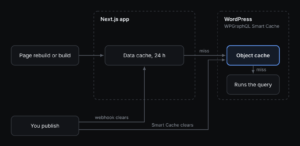
A query gets to the database only when both caches miss. Publishing clears both caches, so new content shows in a few seconds.
Results
After five days, WordPress got 176 GraphQL requests a day. This is more than 90% less than before, and the server had no CPU faults.
| Measure | Before | Nov 4 | Nov 5 | Nov 6 | Nov 7 | Nov 8 |
|---|---|---|---|---|---|---|
| GraphQL requests to WordPress | 2,400–2,900 | — | 1,196 | 334 | 335 | 176 |
| CPU limit faults | most days | a few | some | a few | a few | none |
| Production builds | 3 per release | 2 | 5 | 0 | 1 | 0 |
| Blog list rebuilds | about 1,300 | 268 | 43 | 81 | 59 | 42 |
| ClaudeBot visits to the blog list | 1,073 | 4 | — | 0 | 0 | 0 |
Each column shows 24 hours from about 09:00 Paris time. A dash means that we have no figure for that day. On Nov 6, our own development work caused more than half of the requests.
The remaining faults came in short bursts. Each production build gets the whole site at once. On coding days, our own development work adds more requests. Our last fix was a WordPress setting: the Smart Cache object cache. It keeps answers long enough to cover the time between two releases. On Nov 8 we had no release, so our next build will show the result.
Next step: the blog list (not finished yet)
This part is still in progress. The blog list still links to its own variants: the HTML of /blog has 11 links like ?page=2 and ?tag=seo. Crawlers follow each link, so one page becomes dozens of URLs. A sitemap does not stop this, because crawlers follow links first. Our robots.txt rule stops polite crawlers, but it does not fix the cause.
We publish about two posts a week, so each language will have about 100 posts in a year. The fix must scale. We compare three options:
| Option | How it works | For | Against |
|---|---|---|---|
| All posts on one page | The list page has all posts. Page numbers and tags filter in the browser | Simple. One static page. No URL variants | The page gets heavy with 100 or more posts |
| Pages in the URL path | /blog/page/2, /blog/tag/seo. Each page is static and has only its own posts | Scales to hundreds of posts. Real URLs that search engines can index | More routes. Old ?page= links need redirects |
| Partial rendering (Next.js 16) | A static page shell. The list part is cached for each page and tag | Small change in the page code | Needs a major Next.js upgrade. Crawlers still follow every ?page= link |
None of these options fits us fully yet: each one fixes part of the problem and adds a new cost. So we keep looking, and we will add the result here.
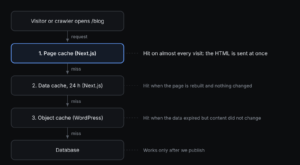
Whatever we choose, the goal stays the same: a normal visit stops at the page cache, and the database works only after we publish. Publishing clears all three caches, so new posts still show in a few seconds.
Checklist for your headless WordPress site
Does your WordPress host report heavy GraphQL traffic? Check these points before you buy a larger plan.
- Find who sends the requests. A
nodeuser agent means your own frontend. A bot name means that the bot calls WordPress directly. - Find the pages that are never cached. In your hosting logs, look for routes that always show
MISS. Usually, these are pages that read search parameters. - Check who visits these pages. If most visitors are crawlers, block the URL variants in
robots.txt. Do not block the full page. - Keep your cache longer. Cache WordPress data for one day. Use a webhook to refresh it when you publish. Do not get new data every hour.
- Count your builds. Each preview build gets your full site. If you do not use previews, build only production.
- Turn on the object cache. In WPGraphQL Smart Cache, select Use Object Cache. Change the expiration from the 10-minute default to 24 hours or more. It works with POST requests and clears itself when you publish.
- Reject junk URLs early. Before you query WordPress, return 404 for each URL that is not a real route.
- Control your filter and page URLs. Give pages and filters real, cacheable URLs, or keep them out of links. Otherwise one list page becomes dozens of URLs for crawlers.